All posts by pj1junj

Troubleshooting Common Issues with Push Buttons and Indicator Lamps

Introduction

Push buttons with indicator lamps are widely used in industrial control panels, machinery, and automation systems. While they are reliable components, like all electrical devices, they can occasionally experience issues that affect system performance or operator safety.
Common Problems with Push Buttons and Indicator Lamps

Indicator Lamp Does Not Light Up

Possible Causes:

Burned-out lamp (incandescent) or failed LED.

Loose wiring or poor contact in the circuit.

Incorrect voltage supplied to the lamp.

Faulty button mechanism preventing signal transmission.

Troubleshooting Steps:

Check the lamp for visible damage; replace if necessary.

Test wiring connections and tighten any loose terminals.

Measure voltage at the lamp terminals to ensure it matches specifications.

Inspect the push button for mechanical issues; replace if stuck or broken.

Push Button Feels Stiff or Does Not Return

Possible Causes:

Dirt, dust, or debris inside the button actuator.

Mechanical wear or damage to internal components.

Incorrect installation causing misalignment.

Troubleshooting Steps:

Clean the button actuator and surrounding area.

Lubricate moving parts if recommended by the manufacturer.

Check installation alignment and correct any misalignment.

Replace the button if mechanical failure persists.

Button Press Does Not Activate the Circuit

Possible Causes:

Worn or damaged internal contacts.

Faulty wiring or loose connections.

Incompatible voltage or current rating.

Defective lamp affecting circuit continuity (in some wiring configurations).

Troubleshooting Steps:

Inspect and clean contacts; replace if pitted or corroded.

Verify wiring connections and ensure secure terminals.

Confirm that the button is rated for the system voltage and current.

Test the circuit with a multimeter to isolate the fault.

Intermittent Lamp Operation

Possible Causes:

Loose or oxidized wiring connections.

Faulty LED driver or lamp.

Electrical noise or transient voltage spikes in the control system.

Troubleshooting Steps:

Tighten or re-solder any loose connections.

Replace defective lamps or LED modules.

Use surge protection or filtering to minimize voltage spikes.

Multiple Buttons or Lamps Fail Simultaneously

Possible Causes:

Power supply failure or voltage drop.

Blown fuse or tripped circuit breaker.

Grounding or short circuit issues in the panel.

Troubleshooting Steps:

Check the power supply and restore proper voltage.

Replace blown fuses or reset circuit breakers.

Inspect for short circuits or grounding faults; repair as needed.

Tips to Prevent Push Button and Indicator Lamp Issues

Regular Inspection: Periodically check buttons and lamps for wear or damage.

Proper Installation: Follow manufacturer guidelines for wiring and mounting.

Environmental Protection: Use appropriate IP-rated buttons in dusty or wet environments.

Correct Voltage and Current: Always match the button and lamp specifications to your system.

Cleanliness: Keep control panels clean to prevent dust and debris from affecting operation.

Conclusion

Push buttons with indicator lamps are critical components in control systems and industrial automation, providing both operator control and visual feedback. By understanding common issues and following systematic troubleshooting steps, you can maintain reliable operation, minimize downtime, and ensure operator safety.

Regular maintenance, correct installation, and attention to environmental conditions will significantly extend the life and performance of your push buttons and indicator lamps.

FAQ

Q1: How do I know if a push button or the lamp is faulty?
Test the lamp independently with the correct voltage. If the lamp works but the button doesn’t activate the circuit, the fault is likely in the push button contacts.

Q2: Can LED push buttons fail suddenly?
LEDs usually fail gradually, dimming over time. Sudden failure may indicate voltage spikes, wiring issues, or overheating.

Q3: Are push buttons with IP ratings maintenance-free?
No. IP-rated buttons resist dust and water, but regular inspection and cleaning are still recommended to ensure reliable operation.
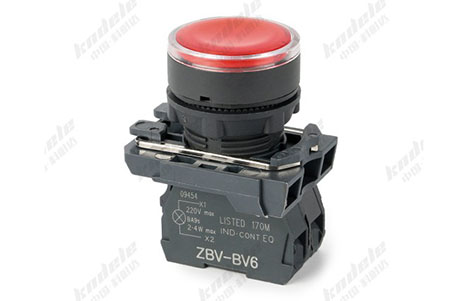
How to Choose the Right Push Button with Indicator Lamp for Your Project

Introduction

Choosing the right push button with indicator lamp is crucial for any control system or industrial automation project. The right selection ensures efficient operation, safety, and reliability, while the wrong choice can lead to frequent maintenance, system downtime, or operational errors.

What Is a Push Button with Indicator Lamp?

A push button with indicator lamp combines a standard push button with a visual signaling lamp. When pressed, the button sends a control signal, and the lamp provides instant feedback to indicate system status, such as ON, OFF, fault, or emergency stop.

These devices are commonly used in industrial control panels, automation systems, machinery, and safety circuits.

Key Factors to Consider When Choosing a Push Button with Indicator Lamp

Type of Operation

Push buttons can operate in different ways:

Momentary (Normally Open/Normally Closed): Returns to its original position after pressing; ideal for start/stop operations.

Latching: Remains pressed until pressed again; suitable for processes that require toggling states.

Choosing the right operation type ensures proper control behavior and safety in your system.

Indicator Lamp Type

The type of lamp affects visibility, durability, and energy efficiency:

LED Lamp: Long-lasting, energy-efficient, low heat generation, ideal for continuous operation.

Incandescent Lamp: Brighter light but shorter lifespan and higher energy consumption.

Tip: LED lamps are preferred in modern industrial applications due to their durability and efficiency.

Voltage and Current Ratings

Ensure the push button matches the voltage and current requirements of your control circuit:

Low voltage DC circuits: Typically 12V, 24V, or 48V.

AC industrial circuits: Commonly 110V, 220V, or 380V.

Incorrect voltage or current rating can damage the button or cause operational failure.

Indicator Color

The lamp color should match the status function:

Red: Emergency stop or fault

Green: Normal operation

Yellow/Amber: Warning or maintenance required

Blue/White: Special function or auxiliary signal

Using standard color codes improves operator clarity and safety.

Mounting and Panel Design

Push buttons come in various mounting types:

Front panel mount: Standard for control panels, easy to install and maintain.

Flush mount: Sleek design, saves panel space, commonly used in compact panels.

Diameter and shape: Ensure compatibility with your panel cutout size.

Durability and Environmental Protection

Check IP ratings for dust and water resistance if used in harsh environments.

Consider mechanical durability, vibration resistance, and temperature range.

Industrial-grade push buttons withstand long-term, continuous operation with minimal maintenance.

Integration with Control Systems

If your system uses PLC or SCADA, ensure the push button:

Provides reliable signaling compatible with the control system.

Allows easy wiring for input/output connections.

Supports status monitoring through the indicator lamp.

Tips for Choosing the Right Push Button for Your Project

Assess Your System Requirements: Determine voltage, current, and environmental conditions.

Consider Operator Interaction: Use colors and tactile feedback that improve usability.

Prioritize Durability: Choose industrial-grade push buttons for long-lasting operation.

Plan for Maintenance: Select buttons that are easy to replace or troubleshoot.

Check Compatibility: Ensure the button integrates seamlessly with PLC, SCADA, or other control systems.

Conclusion

Selecting the right push button with indicator lamp is essential for safety, reliability, and operational efficiency in any industrial or automation project. By carefully considering operation type, lamp type, voltage, color, mounting, durability, and system integration, you can ensure smooth operation, reduce downtime, and improve safety for operators.

Investing in the correct push button from the start saves time, reduces maintenance costs, and enhances overall system performance.

FAQ

Q1: Can I use the same push button for AC and DC circuits?
Some buttons are rated for both, but always check the manufacturer specifications to avoid damage or malfunction.

Q2: How do I choose the right lamp color?
Follow standard industrial color codes: Red for faults, Green for normal operation, Yellow for warnings, Blue/White for auxiliary functions.

Q3: Are LED push buttons better than incandescent ones?
Yes, LEDs are more energy-efficient, durable, and last longer, making them ideal for industrial control panels.

Benefits of Using Push Buttons with Indicator Lamps in Control Systems

Introduction

In modern industrial and commercial control systems, push buttons with indicator lamps are more than simple switches—they provide control functionality and instant visual feedback, improving operational efficiency and safety.

What Are Push Buttons with Indicator Lamps?

A push button with an indicator lamp is a device that combines a push button actuator with a visual signaling lamp. When pressed, the button sends a signal to the control system, while the lamp illuminates to indicate the status of the machine, process, or system.

These devices are widely used in control panels, industrial machinery, automation systems, and safety circuits, offering both manual operation and status monitoring

Key Benefits of Using Push Buttons with Indicator Lamps

Instant Visual Feedback

One of the main advantages is real-time visual feedback.

Operators can immediately see the status of a machine or process, such as whether it is running, stopped, or in a fault condition.

This reduces the risk of human error and allows for faster decision-making.

Enhanced Safety

Push buttons with indicator lamps improve safety in control systems:

The lamp clearly shows emergency stop activation, system faults, or abnormal operating conditions.

Operators can react quickly to prevent accidents, protecting both personnel and equipment.

Simplified System Monitoring

Using these devices in control panels simplifies system monitoring:

Instead of checking multiple devices or digital displays, operators can quickly glance at indicator lamps to assess the system status.

This is especially useful in large-scale industrial automation, where dozens of machines may be monitored simultaneously.

Operational Efficiency

Push buttons with lamps allow for faster and more efficient control:

Immediate feedback reduces downtime caused by uncertainty or delayed responses.

They also help in process control and coordination, ensuring smooth workflow in production lines.

Versatility in Application

These push buttons are highly versatile:

Suitable for AC and DC circuits.

Compatible with PLC and SCADA systems, allowing integration into automated control networks.

Available in various colors, mounting types, and sizes, adapting to different industrial needs.

Durability and Reliability

Industrial-grade push buttons with indicator lamps are designed to withstand harsh environments:

Resistant to dust, moisture, vibration, and high temperatures.

LED lamps provide long-lasting illumination, reducing maintenance frequency.

Ease of Maintenance and Troubleshooting

Indicator lamps make it easier to identify faults or operational issues.

Technicians can quickly detect which system or process requires attention, minimizing downtime and maintenance costs.

Common Applications in Control Systems

Industrial Automation Panels: Show operational status of machines or processes.

Safety and Emergency Circuits: Indicate emergency stop activation or system faults.

Process Control: Start, stop, or reset processes while providing status feedback.

Equipment Monitoring: Signal machine readiness, overload, or maintenance requirements.

Conclusion

Push buttons with indicator lamps are essential components in modern control systems. Their combination of control functionality and instant visual feedback enhances safety, efficiency, and reliability. By providing clear operational signals and simplifying system monitoring, these devices are indispensable in industrial automation, manufacturing, and safety applications.

Investing in high-quality push buttons with indicator lamps ensures streamlined operations, reduced downtime, and improved system safety.

FAQ

Q1: Can push buttons with indicator lamps be used in outdoor or harsh environments?
Yes, industrial-grade models often have IP ratings for dust and water resistance and can operate in harsh conditions.

Q2: What is the difference between LED and incandescent indicator lamps?
LEDs are more energy-efficient, durable, and longer-lasting, while incandescent lamps offer brighter light but have a shorter lifespan.

Q3: Are push buttons with indicator lamps compatible with PLC systems?
Yes, they can be integrated with PLC and SCADA systems for automated control and monitoring.

Top Applications of Push Buttons with Indicator Lamps in Industrial Automation

Introduction

Push buttons with indicator lamps are essential components in industrial automation systems. They provide both control functionality and visual feedback, making them indispensable for operators and engineers who need reliable and immediate system status information.

What Are Push Buttons with Indicator Lamps?

A push button with an indicator lamp is a switch that combines a standard push button with a visual signal. When pressed, the button sends a control signal, while the lamp lights up to indicate the status of the connected system, such as “ON,” “OFF,” or “fault.”

These devices are widely used in control panels, machinery, and industrial equipment, providing both operational control and instant feedback for safety and efficiency

Top Applications in Industrial Automation

Machine Start and Stop Control

Push buttons with indicator lamps are commonly used to start or stop industrial machines.

Example: Pressing a green push button starts a conveyor belt, while the lamp lights up to show the system is running.

This instant visual feedback helps operators avoid accidental machine activation or shutdown, improving safety and efficiency.

Status Indication in Control Panels

Control panels often use push buttons with lamps to indicate machine or system status:

Red Lamp: Fault or emergency stop condition.

Green Lamp: Normal operation.

Yellow/Amber Lamp: Warning or maintenance required.

This application allows operators to monitor multiple machines at a glance, reducing downtime and operational errors.

Emergency Stop (E-Stop) Systems

In industrial safety systems, push buttons with indicator lamps serve as emergency stop controls:

Pressing the button halts equipment immediately, while the lamp signals an emergency state.

This ensures rapid response in hazardous situations, protecting both personnel and machinery.

Process Control in Manufacturing

In automated production lines, push buttons with indicator lamps are used for process control and monitoring:

Operators can start, pause, or stop a specific production process.

Indicator lamps show machine readiness, process completion, or fault detection.

Common in packaging lines, robotic assembly, and CNC machining.

Equipment Reset and Fault Acknowledgment

Push buttons with lamps are also used for resetting equipment or acknowledging alarms:

After a fault or error occurs, pressing the button resets the system, while the lamp provides confirmation of reset success.

This ensures smooth production continuity and prevents repeated errors.

Integration with Automated Control Systems

Push buttons with indicator lamps can be integrated into PLC (Programmable Logic Controller) and SCADA systems:

Operators can interact directly with the machine interface.

The lamp’s status is often linked to real-time process variables, allowing quick diagnosis and control.

Advantages of Using Push Buttons with Indicator Lamps in Automation

Visual Feedback: Immediate indication of machine status.

Enhanced Safety: Reduces human error and prevents accidents.

Operational Efficiency: Streamlines control of complex machinery.

Versatility: Suitable for various voltage levels, mounting types, and industrial environments.

Durability: Designed to withstand harsh industrial conditions, including dust, moisture, and vibration.

Conclusion

Push buttons with indicator lamps play a crucial role in industrial automation, offering both control and feedback in one compact device. From starting machinery to signaling faults and integrating with advanced control systems, these components enhance safety, efficiency, and reliability across industrial operations.

Investing in high-quality push buttons with indicator lamps ensures smooth operation, reduces downtime, and provides clear visual feedback, making them a must-have for modern automated facilities.

FAQ

Q1: Can push buttons with indicator lamps be used in hazardous environments?
Yes, industrial-grade models with proper IP ratings and certifications are designed for dust, water, and explosion-prone environments.

Q2: What colors of indicator lamps are typically used in industrial automation?

Red: Emergency or fault

Green: Normal operation

Yellow/Amber: Warning or maintenance

Blue/White: Special functions or auxiliary signals

Q3: Are LED lamps better than incandescent lamps in push buttons?
Yes, LEDs are more energy-efficient, durable, and long-lasting, making them ideal for continuous industrial operation.

What Is a Push Button with Indicator Lamp? Definition and Working Principle

Introduction

Push buttons with indicator lamps are widely used components in industrial control systems, machinery, and electrical panels. They combine the functionality of a standard push button with a visual signal, making them essential for operators who need instant feedback on system status.

Definition of a Push Button with Indicator Lamp

A push button with indicator lamp is a device that integrates a mechanical or electronic push button with an indicator lamp. The push button allows a user to start, stop, or control a device, while the indicator lamp provides a visual signal to show the status of the equipment, such as “ON,” “OFF,” or a fault condition.

Key components include:

Button actuator: The part that is pressed by the operator.

Indicator lamp: Often LED or incandescent, it illuminates to provide a visual signal.

Contacts or switches: Connects the button to the electrical circuit to trigger an action.

Housing and mounting: Protects internal components and ensures secure installation on control panels.

How a Push Button with Indicator Lamp Works

The working principle is simple yet highly effective for industrial control:

Normal Operation

When the button is not pressed, the lamp can either be off (indicating “inactive”) or on (depending on wiring).

Button Pressed

Pressing the button closes or opens the internal electrical contacts, sending a signal to the connected device or system.

Simultaneously, the indicator lamp may light up to show the action has been executed (e.g., a machine has started).

Feedback Function

The lamp serves as instant visual feedback. For example, a green lamp may indicate normal operation, while a red lamp may indicate a warning or fault.

Types of Push Buttons with Indicator Lamps

Push buttons can vary based on actuator type, lamp type, and operation:

By Lamp Type

LED indicator: Energy-efficient, long-lasting, commonly used in modern systems.

Incandescent lamp: Traditional, offers bright illumination but shorter lifespan.

By Operation Type

Momentary push button: Returns to original position after being pressed.

Latching push button: Stays in pressed position until pressed again.

By Panel Mounting

Front panel mount: Standard for control panels.

Flush mount: For sleek, space-saving designs.

Applications of Push Buttons with Indicator Lamps

Industrial Automation: Start/stop motors, conveyor belts, or robotic arms.

Control Panels: Indicate system status or operational mode.

Safety Systems: Provide warnings for faults, overheating, or emergency stop conditions.

Consumer Electronics: Used in appliances or devices requiring status indication.

Advantages of Using Push Buttons with Indicator Lamps

Instant Visual Feedback: Operators immediately know the system status.

Improved Safety: Reduces the risk of human error in machinery operation.

Versatility: Can be integrated into almost any electrical or electronic control system.

Durability: Industrial-grade models withstand harsh conditions.

Conclusion

A push button with an indicator lamp is more than just a simple switch. It combines control and feedback, enhancing efficiency, safety, and usability in industrial and commercial applications. Whether you are designing a control panel or upgrading machinery, understanding the working principle and selecting the right type of push button with indicator lamp is critical for reliable operation.

FAQ

Q1: Can a push button with an LED lamp work on AC and DC circuits?
Yes, depending on the button’s design and voltage rating, it can operate on both AC and DC circuits. Always check the manufacturer specifications.

Q2: What colors are available for indicator lamps?
Common colors include red, green, yellow, blue, and white, each often used to indicate different statuses.

Q3: Are LED indicator lamps better than incandescent ones?
LEDs are more energy-efficient, last longer, and are more durable, making them the preferred choice in most modern systems.

Safety Advantages of Using Normally Closed Push Button Switches

Introduction

In industrial control systems and safety-critical applications, the choice of switching components can directly impact operator safety and equipment protection. One widely adopted safety solution is the Normally Closed (NC) push button switch. Its design and operating logic make it especially suitable for emergency stops, machine protection, and fail-safe control circuits.

Fail-Safe Operation by Design

The most important safety advantage of an NC push button switch is its fail-safe behavior. In the normal state, the circuit is closed and continuously monitored. If any failure occurs—such as a broken wire, loose terminal, or switch damage—the circuit opens automatically.

This ensures that:

Equipment shuts down safely during faults

Hidden electrical failures are detected immediately

Unsafe machine operation is prevented

Immediate Power Interruption in Emergencies

When an NC push button is pressed, the electrical circuit opens instantly, cutting off power or control signals without delay. This rapid response is critical in emergency situations where seconds—or even milliseconds—can prevent serious injury or damage.

NC push buttons are therefore ideal for:

Emergency stop (E-stop) systems

Hazardous machinery shutdown

Operator safety controls

Continuous Circuit Integrity Monitoring

Because NC circuits remain closed during normal operation, they continuously verify that all wiring and contacts are intact. Any interruption in the circuit—intentional or accidental—results in system shutdown.

This provides:

Early detection of wiring faults

Higher system reliability

Reduced risk of undetected failures

Compliance with International Safety Standards

Normally Closed push button switches are strongly recommended or required by international safety standards, including:

IEC 60204-1 – Safety of machinery (electrical equipment)

ISO 13850 – Emergency stop function

EN 418 – Emergency stop devices

These standards emphasize NC contacts with positive opening action to ensure reliable safety performance.

Prevention of Accidental or Automatic Restart

After activation, an NC push button keeps the circuit open until it is manually reset. This prevents machines from restarting automatically after power restoration or fault recovery.

This feature:

Protects maintenance personnel

Ensures hazards are addressed before restart

Reduces the risk of unexpected machine motion

Reliable Performance in Harsh Industrial Environments

NC push button switches used in safety applications are designed to withstand:

Vibration and mechanical shock

Dust, moisture, and oil

Temperature extremes

Their robust construction and simple mechanical design contribute to long-term reliability in demanding industrial environments.

Clear and Intuitive Safety Function

The behavior of NC push button switches aligns with operator expectations:

Pressing the button always stops the system

Releasing the button does not automatically restart the machine

This intuitive operation reduces human error during emergency situations.

Suitable for Series Wiring in Safety Circuits

NC push button switches can be wired in series across multiple safety points. Pressing any one switch opens the circuit and stops the entire system.

This design:

Expands safety coverage

Simplifies control logic

Enhances overall system protection

Reduced Risk of Electrical and Mechanical Damage

By stopping equipment immediately during faults or emergencies, NC push button switches help prevent:

Motor overload and overheating

Mechanical collisions or jams

Secondary damage to connected systems

This not only improves safety but also extends equipment lifespan.

Conclusion

The safety advantages of using Normally Closed push button switches make them a fundamental component in industrial control and protection systems. Their fail-safe design, rapid response, continuous monitoring, and compliance with safety standards ensure reliable protection for both personnel and equipment.

For any safety-critical application—especially emergency stop circuits—NC push button switches remain the preferred and trusted choice.