All posts by pj1junj

Key Features of LED Momentary Push Buttons for Industrial Control Panels

Introduction

In industrial automation, control panels serve as the central hub for machinery operation, monitoring, and safety management. LED momentary push buttons are essential components of these panels, providing intuitive user input, visual feedback, and operational reliability.
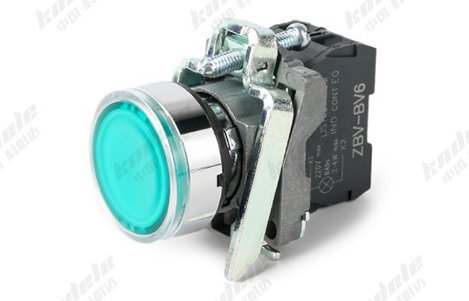
What Is an LED Momentary Push Button?

An LED momentary push button is a type of switch that completes a circuit only while being pressed. Unlike latching buttons, it returns to its original position once released.

The LED component provides visual feedback, often indicating operational status, machine readiness, or fault conditions. This combination of tactile control and visual signaling makes it ideal for industrial applications.

Key Features of LED Momentary Push Buttons

Momentary Action

The core feature is the momentary operation. When pressed:

The button closes the circuit temporarily

Sends a control signal to machinery or PLC

Returns to its default state upon release

This ensures precise, instantaneous input for start, stop, or emergency operations.

LED Status Indicator

The integrated LED offers visual feedback, which can be used to indicate:

Machine running status

Fault or error conditions

Power-on/off indicators

Process stages in automation

LEDs are energy-efficient, have a long lifespan, and are visible even in low-light industrial environments.

Durable Construction

Industrial LED push buttons are designed to withstand harsh conditions:

Metal or reinforced plastic housing resists impact

Anti-vandal or rugged design prevents accidental damage

Sealed construction protects against dust, moisture, and oil

High durability ensures long-term reliability in factories, processing plants, and outdoor control panels.

Wide Voltage and Current Ratings

LED momentary push buttons are compatible with a range of control voltages and currents:

Low-voltage DC circuits for PLC and automation systems

AC mains control for larger machinery

Integrated resistors for LED operation without external circuitry

This versatility makes them suitable for multiple industrial environments.

IP Rating and Environmental Protection

Most industrial-grade LED push buttons offer IP65 or higher protection, meaning they are:

Dust-tight

Protected against water jets

Suitable for outdoor or washdown areas

Environmental resistance ensures safe operation in demanding conditions.

Customizable LED Colors

Many push buttons allow custom LED colors, such as red, green, yellow, blue, or white, to standardize panel indicators:

Red for emergency stop

Green for start or ready

Yellow for warning or caution

Blue for auxiliary functions

Customizable colors improve operational clarity and safety.

Easy Integration and Mounting

LED momentary push buttons are designed for panel mounting:

Standardized hole sizes for quick installation

Snap-in or screw-in options

Modular components for easy wiring and replacement

This makes installation efficient, even in complex industrial panels.

Long Lifespan

High-quality push buttons combine mechanical durability with long-lasting LED illumination, offering:

Tens of thousands of mechanical operations

Decades of reliable LED performance

Minimal maintenance requirements

This reduces downtime and maintenance costs.

Applications in Industrial Control Panels

LED momentary push buttons are used in:

Machine start/stop controls

Emergency stop functions

Conveyor and automation line operations

Control of pumps, motors, and valves

Status indication for process monitoring

Human-machine interface (HMI) panels

Their combination of tactile feedback and visual signaling makes them indispensable in modern industrial systems.

Advantages in Industrial Environments

Clear visual indication of machine or process status

Immediate response through momentary action

High durability and environmental resistance

Easy to install and integrate

Reduces human error and improves safety

Conclusion

LED momentary push buttons are a vital component of industrial control panels, combining mechanical reliability with visual feedback. Their features—including momentary action, LED indication, rugged construction, IP protection, and customizable options—make them suitable for a wide range of industrial applications.

By choosing high-quality LED momentary push buttons, factories and automation systems can enhance operator safety, process efficiency, and panel reliability.

FAQ

1. What is an LED momentary push button?

An LED momentary push button is a switch that activates only while being pressed and returns to its original state when released. The integrated LED provides visual feedback, showing machine status, process stage, or fault conditions.

2. How does a momentary push button differ from a latching push button?

Momentary push button: Circuit is closed only while pressed; returns to default state when released.

Latching push button: Circuit stays closed or open until pressed again.

Momentary buttons are ideal for start, stop, or emergency controls.

3. What are the typical applications of LED momentary push buttons?

Machine start/stop operations

Emergency stop functions

Conveyor and automated line control

Pump, motor, or valve operation

Status indication on industrial panels

Human-machine interface (HMI) systems

4. What LED colors are available and what do they indicate?

Common LED colors and typical meanings:

Red: Emergency stop or fault

Green: Start or ready

Yellow: Warning or caution

Blue: Auxiliary functions

White: General indication

Custom colors can be selected based on panel design and operational needs

5. What is the IP rating of industrial LED push buttons?

Most industrial LED push buttons have IP65 or higher, meaning they are:

Dust-tight

Protected against water jets

Suitable for outdoor or washdown environments

Higher ratings (IP66/IP67) are available for harsher conditions.

6. What materials are used in LED momentary push buttons?

Metal housing: Provides strength and impact resistance

Reinforced plastic: Offers insulation and chemical resistance

UV-stabilized plastics: Protect LED and housing from sun exposure

These materials ensure durability in industrial environments.

7. What voltage and current ratings do LED momentary push buttons support?

Compatible with low-voltage DC control circuits for PLCs and automation

Can also operate in AC mains circuits for larger machines

Some models include built-in resistors for LED operation without external components

8. Are LED momentary push buttons durable?

Yes. High-quality buttons are designed for tens of thousands of mechanical operations and long-lasting LED life, ensuring minimal maintenance and long-term reliability.

9. Can LED momentary push buttons be easily installed on control panels?

Yes. They are designed for standard panel cutouts, with snap-in or screw-in mounting options. Wiring is modular, allowing easy integration and replacement.

10. Why are LED momentary push buttons important in industrial safety?

They provide tactile feedback and visual indication, reducing human error, improving process control, and ensuring immediate response in critical operations.
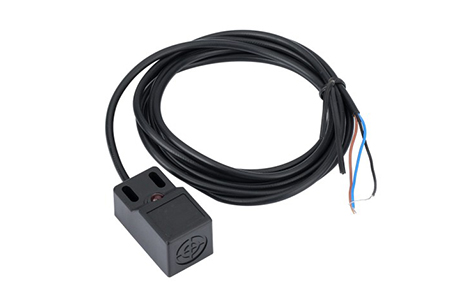
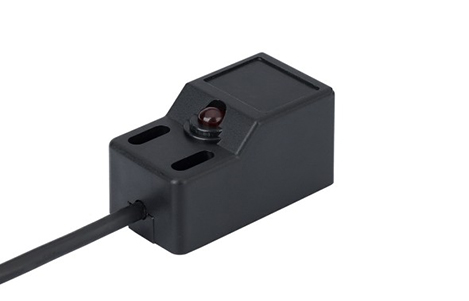
Installation Tips and Maintenance for Angle Post Type Proximity Switches

Introduction

Angle Post Type Proximity Switches are widely used in industrial automation due to their compact right-angle design and reliable non-contact sensing capabilities. However, to ensure optimal performance and longevity, proper installation and routine maintenance are crucial. This guide provides practical tips and best practices for installing and maintaining these sensors in your system.

Why Proper Installation Matters

Incorrect installation of angle post proximity switches can lead to:

False triggering or missed detections

Premature wear or sensor damage

Unnecessary downtime in automated systems

Reduced safety in critical applications

By following best practices, you can maximize sensor accuracy, durability, and reliability, especially in tight or complex machinery setups.

Installation Tips for Angle Post Type Proximity Switches

Check the Mounting Location

Choose a location that provides stable support and avoids vibration as much as possible.

Ensure the sensor can detect the target object without obstruction.

Avoid areas where dust, oil, or metal shavings can accumulate unless the sensor is rated for harsh environments.

Maintain Proper Sensing Distance

Follow the manufacturer’s specified sensing range.

Keep a minimum distance from nearby metal surfaces to prevent interference (for inductive sensors).

Angle post designs help fit in tight spaces, but clearance is still critical for accurate detection.

Secure the Sensor Firmly

Use the recommended mounting brackets, screws, or clamps.

Avoid over-tightening, which can damage the sensor body or affect alignment.

Correct Electrical Connections

Verify the voltage and current ratings before wiring.

Follow proper polarity and connection diagrams provided in the datasheet.

Use shielded cables if the sensor is installed near motors or other high-power equipment to reduce electrical noise.

Protect Against Environmental Hazards

If installed in dusty, wet, or high-vibration areas, select sensors with appropriate IP ratings.

Consider additional protective covers or conduit for extreme conditions.

Maintenance Tips for Long-Term Performance

Regular Cleaning

Wipe the sensor face with a soft, dry cloth or a cloth slightly dampened with a mild cleaner.

Avoid abrasive materials that could scratch the sensor.

Keep the mounting area free from dust, grease, or metal particles.

Periodic Inspection

Check mounting hardware for looseness or corrosion.

Inspect cables and connectors for wear, cuts, or fraying.

Verify alignment and adjust if needed to ensure consistent sensing.

Functional Testing

Test the sensor periodically using test targets to ensure it triggers correctly.

For automated systems, confirm that sensor output integrates properly with PLC or control units.

Avoid Excessive Stress

Angle post sensors are durable, but avoid forcing mechanical stress or bending cables sharply.

Ensure robotic arms, conveyors, or moving parts do not collide with the sensor body.

Common Installation Mistakes to Avoid

Mistake Consequence Tip
Ignoring sensing distance Missed detections or false triggers Always follow manufacturer specs
Loose mounting Sensor misalignment Secure brackets and screws properly
Poor cable management Electrical noise or damage Use shielded cables and proper routing
Ignoring environment Sensor failure due to dust, moisture, or vibration Choose IP-rated or ruggedized sensors
Over-tightening Cracks or misalignment Tighten screws gently according to specs

Conclusion

Proper installation and maintenance of angle post type proximity switches are essential for reliable performance in industrial automation systems. By carefully considering mounting, wiring, and environmental protection, and performing regular cleaning and inspection, you can extend sensor life, reduce downtime, and ensure accurate detection in even the most compact or challenging setups.

FAQ

Q1: Can angle post proximity switches be installed in tight spaces?
A: Yes, their right-angle design is specifically intended for compact or awkward spaces, but clearance for proper sensing is still required.

Q2: How often should I inspect the sensors?
A: Ideally every 3–6 months, or more frequently in harsh environments.

Q3: Can I use standard cleaning chemicals?
A: Only mild, non-abrasive cleaners are recommended. Avoid strong solvents that may damage the sensor housing.

Q4: What if the sensor stops detecting accurately?
A: Check alignment, wiring, and target surface. Replace if the sensor face is scratched or damaged.

The Future of Angle Post Type Proximity Switches in Smart Manufacturing

Introduction

As industries embrace Industry 4.0, smart manufacturing relies heavily on precise, reliable, and flexible automation solutions. Among the essential components enabling this evolution are Angle Post Type Proximity Switches. These sensors, known for their right-angle design and space-saving capabilities, are increasingly playing a key role in modern production systems. This article explores their current applications, technological advancements, and future potential in smart manufacturing.

What Are Angle Post Type Proximity Switches?

Angle Post Type Proximity Switches are non-contact sensors designed with a right-angle body. Unlike standard straight sensors, angle post switches can fit into tight or complex machine geometries, making them ideal for:

Confined automation spaces

Robotics with multi-axis movement

Equipment with overlapping or intricate layouts

They are commonly available in inductive, capacitive, and magnetic versions, each tailored to detect different materials and environmental conditions.

Role of Angle Post Proximity Switches in Smart Manufacturing

In smart factories, automation precision and reliability are crucial. Angle post proximity switches contribute in several ways:

Optimized Space Utilization

Their right-angle design allows installation in compact machinery, enabling high-density automation layouts.

Enhanced Machine Flexibility

They support complex movements of robotic arms, pick-and-place systems, and CNC machines, ensuring accurate detection without physical interference.

Improved Safety and Monitoring

By detecting the position of machine parts, tools, and components in real time, these sensors prevent collisions and enhance operator safety.

Seamless Integration with Smart Systems

Modern angle post switches often support IoT connectivity, providing real-time data to factory management systems for predictive maintenance and performance analytics.

Technological Trends Shaping the Future

The future of angle post proximity switches in smart manufacturing is being driven by several key technological trends:

Miniaturization and Compact Design

Smaller sensors allow deployment in even more constrained spaces, increasing the flexibility of automated systems.

Advanced Materials and Durability

New sensor housings are resistant to extreme temperatures, vibration, dust, and moisture, enabling reliable operation in harsh industrial environments.

Smart Connectivity

Integration with IoT and IIoT platforms allows real-time monitoring, predictive maintenance, and data-driven optimization of manufacturing processes.

Higher Precision and Faster Response

Improvements in sensing accuracy and response times make angle post switches suitable for high-speed automated production lines.

Energy Efficiency

Low-power designs reduce energy consumption, aligning with sustainable manufacturing initiatives.

Applications in Smart Manufacturing

Angle post proximity switches are increasingly used in high-tech, automated factories, including:

Robotics and Assembly Lines: Detecting positions of robotic arms and parts with limited space.

Packaging and Material Handling: Monitoring objects on conveyors with complex layouts.

CNC and Milling Machines: Ensuring tool and workpiece positions in confined setups.

Automotive Manufacturing: Supporting high-speed assembly lines requiring precise detection in tight spaces.

Choosing the Right Angle Post Proximity Switch

When selecting an angle post proximity switch for smart manufacturing applications, consider:

Sensing Range and Type – Inductive for metals, capacitive for non-metals.

Mounting and Clearance – Ensure the right-angle design fits your machinery.

Durability Requirements – Temperature, vibration, dust, and moisture resistance.

Integration Capability – Compatibility with IoT or industrial automation networks.

The Future Outlook

As factories continue to evolve toward fully automated, data-driven smart systems, angle post proximity switches will become more sophisticated:

Smarter sensors with AI-based diagnostics

Wireless communication for flexible layouts

Predictive maintenance features integrated directly into the sensor

Miniaturized designs for micro-automation setups

The right-angle design will remain indispensable for applications where space constraints and complex machine geometries exist, ensuring that angle post proximity switches continue to play a vital role in the next generation of smart manufacturing.

FAQ

Q1: Can angle post switches replace standard proximity switches?
A: They complement standard switches. Use angle post switches in tight or complex spaces where straight sensors cannot fit.

Q2: Are these switches compatible with IoT systems?
A: Modern angle post proximity switches often support IoT or IIoT integration for real-time monitoring and predictive maintenance.

Q3: What materials can they detect?
A: Inductive versions detect metals, capacitive detect non-metals, and magnetic versions can sense magnetic targets.

Angle Post vs. Standard Proximity Switch: Which One Fits Your Application?

Introduction

In modern automation and industrial applications, choosing the right proximity switch can significantly impact system performance, reliability, and cost. Two of the most commonly discussed options are Angle Post Proximity Switches and Standard Proximity Switches. This article explores their differences, applications, and key considerations to help you make an informed choice.

What Is a Proximity Switch?

A proximity switch is a non-contact sensor that detects the presence or absence of an object, usually metal, within a certain range. These switches are widely used in:

Automated manufacturing

Conveyor systems

Robotics

Safety monitoring

There are several types of proximity switches, including inductive, capacitive, and magnetic, but their core function remains the same: detecting objects without physical contact.

Angle Post Proximity Switch: Definition and Advantages

Angle Post Proximity Switches are designed with a right-angle mounting configuration, which allows the sensor to detect objects in tight or awkward spaces where standard straight sensors cannot fit.

Key advantages include:

Space-Saving Design

Ideal for confined areas or machinery with limited clearance.

Flexible Mounting

Can be mounted at angles that suit complex layouts.

Durability in Harsh Environments

Often encased in rugged materials to withstand vibration, dust, and moisture.

Typical Applications:

Packaging machines with limited sensor clearance

CNC machines with complex tool paths

Robotics arms requiring angled sensing

Standard Proximity Switch: Definition and Advantages

Standard Proximity Switches usually have a straight, cylindrical body and are easy to install in most applications.

Key advantages include:

Ease of Installation

Straightforward mounting on flat surfaces.

Cost-Effective

Generally more affordable than specialized angle post versions.

Wide Range of Sensing Distances

Available in various sizes to detect small or large objects.

Typical Applications:

Conveyor belt systems

General automation equipment

Level detection in tanks or silos

Angle Post vs. Standard Proximity Switch: Key Differences

Feature Angle Post Switch Standard Switch
Mounting Right-angle, flexible Straight, linear
Space Requirements Fits tight spaces Requires more clearance
Cost Usually higher More cost-effective
Application Complex layouts, compact machines General automation tasks
Durability Often more rugged Standard industrial protection

How to Choose the Right Switch for Your Application

When deciding between an angle post and a standard proximity switch, consider the following factors:

Space and Mounting Requirements

If your system has tight corners or limited clearance, an angle post switch may be necessary.

Sensing Range and Object Size

Ensure the switch can detect your target object reliably.

Environment Conditions

Dust, moisture, vibration, and temperature extremes may dictate a more rugged design.

Budget Constraints

Standard switches are typically more cost-effective for simple layouts.

Maintenance and Accessibility

Consider how easy it is to install, adjust, or replace the switch in your setup.

Conclusion

Choosing between an Angle Post Proximity Switch and a Standard Proximity Switch ultimately depends on your specific application requirements.

Use Angle Post switches for tight, complex, or compact systems.

Use Standard switches for straightforward, general-purpose automation tasks.

By understanding their differences and advantages, you can optimize system performance, reduce downtime, and ensure long-term reliability.

FAQ

Q1: Can a standard switch be used in a tight space?
A: Usually not, as it may require additional mounting adapters or modifications, making an angle post switch a better choice.

Q2: Are angle post switches more expensive?
A: Yes, typically due to their specialized design and rugged build.

Q3: What types of objects can proximity switches detect?
A: Most commonly metal objects, but capacitive versions can detect non-metallic materials like plastics, liquids, or powders.

Preventing Electrical Failures: The Role of Voltage Current Protectors in High-Density Circuits

Introduction

As modern electrical systems become increasingly complex, high-density circuits are becoming the norm in both industrial and commercial applications. These circuits, packed with multiple devices and components in a limited space, are particularly vulnerable to voltage fluctuations, current surges, and short circuits. Failure in a single component can have a cascading effect, causing downtime, equipment damage, or safety hazards.

This is where Voltage Current Protectors (VCPs) play a critical role. They monitor, regulate, and protect circuits from abnormal electrical conditions, ensuring reliability and safety in high-density setups. In this article, we explore the role of VCPs in preventing electrical failures and maintaining optimal performance.

Understanding High-Density Circuits

High-density circuits refer to systems where multiple electrical components or devices are installed close together, often in compact panels, data centers, or industrial control boards. While this design maximizes space and efficiency, it also increases the risk of:

Overvoltage or undervoltage issues caused by fluctuating supply

Overcurrent conditions due to simultaneous operation of multiple devices

Short circuits resulting from tight wiring layouts

Heat accumulation, which can degrade insulation and electronic components

In such environments, a single electrical failure can propagate quickly, leading to major system disruptions.

How Voltage Current Protectors Safeguard High-Density Circuits

Voltage Current Protectors offer real-time monitoring and rapid response, making them essential for high-density circuits. Their core functions include:

Overvoltage Protection: Detects spikes from external sources like lightning or grid surges, disconnecting or diverting excess voltage to prevent component damage.

Undervoltage Protection: Ensures sensitive devices continue to operate safely, avoiding malfunctions caused by low voltage.

Overcurrent Protection: Prevents excessive current that could overheat wires or electronic components.

Short-Circuit Protection: Instantly disconnects the circuit in case of a short, preventing cascading failures.

By addressing these electrical threats, VCPs maintain system integrity and prevent costly downtime in high-density environments.

Key Applications in High-Density Circuits

Data Centers and IT Infrastructure

Data centers house hundreds of servers and networking devices in a compact space. Voltage or current fluctuations can lead to server crashes, data loss, or equipment damage. Installing VCPs ensures continuous operation and data integrity.

Industrial Control Panels

Factories often use compact control panels with multiple PLCs, motors, and sensors. VCPs protect these components from electrical faults that could halt production or damage critical equipment.

Renewable Energy Systems

Solar inverters and battery storage systems often operate in high-density configurations. Voltage current protectors ensure stable power distribution, prevent overcurrent, and enhance system longevity.

Commercial Buildings

High-density circuits in office buildings, smart lighting systems, and HVAC setups can benefit from VCPs to prevent overloads and protect sensitive electronics.

Advantages of Using VCPs in High-Density Circuits

Enhanced Safety: Reduces fire risk and electrical hazards caused by overheating or short circuits.

Improved Reliability: Prevents cascading failures in tightly packed systems.

Equipment Longevity: Protects components from stress caused by voltage and current irregularities.

Cost Savings: Reduces maintenance, downtime, and replacement costs in complex systems.

Choosing the Right VCP for High-Density Circuits

When selecting a VCP for high-density applications, consider:

Voltage and Current Ratings: Ensure compatibility with all devices in the circuit.

Fast Response Time: Critical for sensitive electronics and industrial automation.

Type of Protection: Overvoltage, undervoltage, overcurrent, and short-circuit protection.

Installation Form Factor: Panel-mounted or modular designs are often preferred for compact layouts.

Certifications: Look for UL, CE, or IEC approvals to guarantee quality and safety.

Proper selection ensures optimal protection and uninterrupted operation in complex high-density systems.

Conclusion

High-density circuits offer efficiency and compact design but come with increased risk of electrical failures. Voltage Current Protectors are indispensable in these environments, providing real-time monitoring, rapid response, and multi-level protection against overvoltage, undervoltage, overcurrent, and short circuits. Whether in data centers, industrial panels, renewable energy setups, or commercial buildings, investing in the right VCP ensures safety, reliability, and long-term performance.

FAQ

1. Why are high-density circuits more vulnerable to electrical failures?

High-density circuits pack multiple devices in a compact space, which increases the risk of overvoltage, overcurrent, short circuits, and heat accumulation. A single failure can quickly propagate, affecting the entire system.

2. How does a voltage current protector (VCP) prevent failures in high-density circuits?

A VCP monitors voltage and current in real time. It protects circuits by:

Disconnecting or diverting voltage spikes (overvoltage protection)

Ensuring devices operate safely at low voltage (undervoltage protection)

Preventing excessive current (overcurrent protection)

Quickly reacting to short circuits

This helps maintain system reliability and prevents cascading failures.

3. Can VCPs protect sensitive equipment like servers or PLCs?

Yes. VCPs are essential in data centers, industrial control panels, and automation systems, where sensitive electronics can be damaged by even minor voltage or current fluctuations.

4. What type of VCP is best for high-density circuits?

Choose a VCP that offers:

Appropriate voltage and current ratings for your system

Fast response time for sensitive devices

Multi-function protection: overvoltage, undervoltage, overcurrent, and short-circuit

Panel-mounted or modular designs for compact installations

Certifications like UL, CE, or IEC for reliability

5. Do VCPs require maintenance in high-density circuits?

Most modern VCPs are low-maintenance, but periodic inspection of wiring, relays, and connections is recommended, especially in industrial or mission-critical systems.

6. Can VCPs prevent all electrical failures in high-density circuits?

While VCPs greatly reduce risks, proper design, grounding, and cooling are also essential. They should be part of a comprehensive strategy to ensure safe and reliable operation.

How to Choose the Right Voltage Current Protector for Your System

Introduction

Electricity is the lifeblood of modern homes and industrial systems. However, voltage fluctuations, current surges, and electrical faults can damage devices, cause downtime, or even create safety hazards. A Voltage Current Protector (VCP) is designed to safeguard your system by monitoring and regulating voltage and current. But with so many models available, how do you choose the right one? This article guides you through the key factors to consider when selecting a VCP for your system.

Understand Your System Requirements

The first step in choosing a voltage current protector is to evaluate your system’s electrical requirements:

Voltage Level: Identify the nominal voltage your system operates at. Residential systems often use 110–240V, while industrial equipment may require higher voltages like 380V or 480V.

Current Capacity: Determine the maximum current your devices or circuits will draw. Protectors must handle this safely without nuisance tripping.

Load Type: Consider whether your load is resistive (heaters, lights), inductive (motors, transformers), or capacitive (electronic devices), as different loads have different protection needs.

By understanding these parameters, you ensure the VCP can handle your system’s electrical profile efficiently.

Decide the Type of Protection Needed

Voltage current protectors offer various protection functions. Choose one based on the risks your system faces:

Overvoltage Protection: Guards against voltage spikes caused by lightning, grid surges, or switching operations.

Undervoltage Protection: Prevents devices from operating under low voltage, which can cause overheating or malfunctions.

Overcurrent Protection: Protects wiring and devices from excessive current that could lead to fire or damage.

Short-Circuit Protection: Quickly disconnects the circuit to avoid catastrophic damage.

Some advanced VCPs combine all these protections in a single unit, providing comprehensive safety.

Consider Response Time and Sensitivity

Response time is a critical factor, especially for sensitive electronics:

Fast response times (milliseconds) are required for devices like computers, servers, and PLCs.

Slower response may be acceptable for heavy machinery or non-critical equipment.

Additionally, sensitivity settings allow the VCP to trigger only under genuine electrical threats, avoiding unnecessary shutdowns.

Select the Appropriate Installation Type

Voltage current protectors come in various form factors to suit different installations:

Panel-Mounted: Ideal for industrial distribution boards and control panels.

Wall-Mounted: Suitable for residential or small commercial applications.

Plug-In / Socket-Based: Convenient for individual appliances or home office setups.

Choose a type that is compatible with your existing system and allows easy installation and maintenance.

Evaluate Quality, Certifications, and Features

When choosing a VCP, reliability and safety certifications are crucial:

Look for certifications like CE, UL, IEC, or local regulatory approvals.

Check the device’s build quality, including high-quality relays, sensors, and thermal protection.

Some VCPs offer additional features such as:

Digital display of voltage and current

Automatic reset

Remote monitoring for industrial applications

These features enhance usability and ensure long-term performance.

Budget vs. Long-Term Value

While it may be tempting to choose the cheapest option, investing in a high-quality VCP often saves money in the long run by preventing:

Appliance or equipment damage

Industrial downtime

Fire hazards and safety risks

Think of a VCP as insurance for your electrical system—the cost of protection is minimal compared to potential losses.

Conclusion

Choosing the right Voltage Current Protector requires careful consideration of your system’s voltage, current, and load type, as well as the type of protection, response time, installation type, and certifications. A properly selected VCP ensures electrical safety, prolongs equipment lifespan, and prevents costly downtime, whether in a home, office, or industrial environment. Investing in the right protector is a smart step toward reliable and safe electrical operation.

FAQ 

1. What is a voltage current protector (VCP)?

A voltage current protector is a device that monitors and regulates voltage and current in electrical systems. It protects devices from overvoltage, undervoltage, overcurrent, and short circuits.

2. How do I know the voltage and current rating I need?

Check your system’s nominal voltage and maximum current draw. For residential use, typical voltages are 110–240V, while industrial equipment may require 380V or higher. The VCP should safely handle your system’s maximum current without tripping unnecessarily.

3. What type of protection should I choose?

Select a VCP based on the risks in your system:

Overvoltage protection for voltage spikes

Undervoltage protection to prevent low-voltage damage

Overcurrent protection for excessive current

Short-circuit protection for severe faults

Many modern VCPs combine all these protections in a single unit.

4. Does response time matter?

Yes. Sensitive electronics like computers, servers, and PLCs require fast response times (milliseconds) to prevent damage. Heavy machinery or non-critical equipment can tolerate slightly slower response.

5. What installation type should I choose?

Panel-mounted: Industrial distribution boards and control panels

Wall-mounted: Residential or small commercial systems

Plug-in / Socket-based: Individual appliances or home office devices

Choose the type that fits your system and allows easy access for maintenance.

6. Are certifications important when selecting a VCP?

Absolutely. Look for CE, UL, IEC, or local regulatory certifications. They ensure the device meets safety and quality standards.

7. Can a VCP prevent all electrical problems?

A voltage current protector greatly reduces risks, but it cannot prevent every electrical issue. Proper system wiring, grounding, and maintenance are also essential for maximum safety.