Maintenance Tips for Ensuring Long Life of Two Position Push Button Switches

Introduction

Two position push button switches are essential components in industrial machinery, control panels, and automation systems. They provide reliable ON/OFF or START/STOP control, but like all mechanical and electrical devices, their performance can degrade over time if not properly maintained. Proper maintenance ensures long-term reliability, safety, and operational efficiency. In this article, we’ll cover the best maintenance tips for two position push button switches.
Regular Cleaning

Dust, dirt, and debris can accumulate around the switch, affecting its performance.

Surface cleaning: Wipe the button and surrounding panel with a soft, dry cloth.

Deep cleaning: Use compressed air to remove debris inside the switch housing (if accessible).

Avoid liquids: Unless the switch is rated IP65 or higher, avoid water or cleaning solvents.

Inspect Contacts Periodically

The internal contacts are critical for electrical conductivity:

Check for corrosion or oxidation: These can cause poor connectivity or intermittent operation.

Inspect for wear: Repeated pressing can cause contact degradation over time.

Solution: Clean contacts with electrical contact cleaner if corrosion is minor; replace the switch if wear is significant.

Verify Proper Operation

Routine testing ensures switches function correctly:

Press each switch several times to check for smooth movement and consistent electrical response.

Ensure momentary switches return to default position and maintained switches stay latched properly.

Monitor the switch response in actual circuits to detect delayed or incomplete operations.

Check Mounting and Panel Integrity

Loose mounting or damaged panels can reduce the lifespan of a switch:

Ensure the switch is securely mounted and not wobbling.

Inspect for panel cracks or deformation that may stress the switch body.

Tighten any loose screws or mounting hardware.

Protect Against Environmental Factors

Environmental conditions significantly affect switch longevity:

Dusty environments: Use IP65/IP67 rated switches to prevent ingress.

Moisture or humidity: Select switches with water-resistant ratings; consider protective covers.

Temperature extremes: Ensure switches are rated for the ambient temperature of the installation site.

Pro Tip: Industrial switches with sealed or gasketed housings have longer life in harsh conditions.

Lubricate Moving Parts (If Applicable)

Some mechanical switches may benefit from light lubrication:

Use non-conductive lubricants recommended by the manufacturer.

Avoid over-lubrication, which can attract dust and create sticky buttons.

Replace Worn or Damaged Switches Promptly

Even with maintenance, switches wear out over time:

Signs of failure include sticking buttons, erratic electrical behavior, or visible contact damage.

Replace switches promptly to avoid equipment downtime or safety hazards.

Documentation and Maintenance Schedule

Maintaining a log of inspections and maintenance activities helps extend the switch life:

Record the date of inspection, cleaning, and any replacements.

Schedule routine checks based on usage frequency and environmental conditions.

Include emergency stop and critical switches in a higher-priority maintenance cycle.

Conclusion

Proper maintenance of two position push button switches is essential for reliable operation, safety, and longevity. By following these tips—regular cleaning, inspecting contacts, verifying operation, protecting against environmental factors, and prompt replacement—you can maximize switch life and reduce downtime in industrial and automation systems.

FAQ

Q1: How often should push button switches be maintained?

Ideally, inspect and clean them every 3–6 months for normal industrial environments, more frequently in harsh conditions.

Q2: Can maintenance prevent electrical contact wear completely?

No, but proper cleaning and environment protection can significantly slow down wear.

Q3: Are IP-rated switches maintenance-free?

While IP-rated switches resist dust and moisture, regular inspection is still recommended for optimal performance.
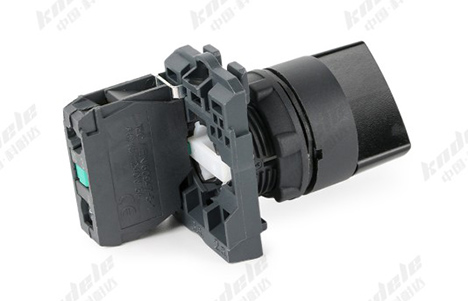
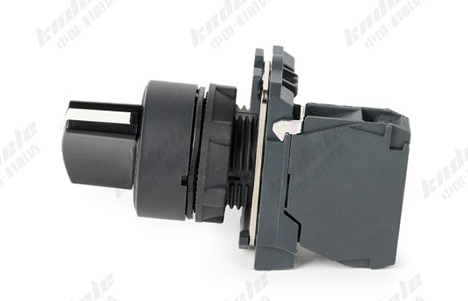
How to Choose the Right Two Position Push Button Switch for Your Project

Introduction

Choosing the right two position push button switch is critical for ensuring safety, efficiency, and reliability in your electrical or automation project. With various types, sizes, and specifications available, making the correct selection can be overwhelming. This guide will walk you through the key considerations, helping you select the ideal switch for your application.

Understand Your Project Requirements

Before selecting a switch, clearly define the purpose and operating conditions of your project:

Functionality: Do you need ON/OFF, START/STOP, or emergency stop control?

Load type: Determine the voltage and current ratings required to handle the connected devices safely.

Environment: Consider whether the switch will operate in indoor, outdoor, dusty, or wet conditions.

Tip: Always select a switch rated slightly higher than your maximum load to ensure safety and longevity.

Choose Between Maintained and Momentary Action

Two position push button switches come in two main actions:

Maintained (Latch) Switch:

Stays in the pressed position until toggled again.

Ideal for machines or devices that need to remain ON until manually turned OFF.

Momentary (Spring-Return) Switch:

Returns to the default position after being pressed.

Commonly used for emergency stop buttons or pulse-triggered operations.

Selection Tip: Determine whether your application requires a continuous state (maintained) or temporary state (momentary).

Determine Contact Configuration

The contact type of a push button switch affects how it controls a circuit:

Normally Open (NO): Circuit closes when the button is pressed.

Normally Closed (NC): Circuit opens when the button is pressed.

Combination (NO + NC): Allows control of multiple circuits simultaneously.

Consider Voltage and Current Ratings

Ensure the switch can handle the electrical load of your project:

Check the maximum voltage and current ratings specified by the manufacturer.

For industrial machinery, switches often need to support AC or DC loads with high amperage.

Avoid overloading the switch, as it can cause contact welding, overheating, or failure.

Evaluate Build Quality and Material

Durability is key in industrial or outdoor environments:

Look for switches made of high-quality plastic, metal, or industrial-grade materials.

Consider IP protection ratings for dust and water resistance (e.g., IP65 or IP67 for harsh conditions).

Check the mechanical life rating (number of operations) to ensure long-term reliability.

Select the Right Size and Mounting Type

Two position push button switches come in various sizes and panel mounting options:

Panel mount: Standard for control panels and machinery interfaces.

Surface mount: Used when space is limited or for custom enclosures.

Flush or raised buttons: Choose based on operator accessibility and ergonomics.

Consider Additional Features

Some push button switches offer extra functionalities:

Illumination: LED indicator lights to show ON/OFF status.

Color coding: Red for STOP, green for START, yellow for caution.

Custom labeling or symbols: Useful in complex control panels.

These features can improve safety, visibility, and user experience.

Verify Compliance and Standards

Industrial and electrical projects often require switches to meet certification and safety standards:

IEC, UL, CE, or RoHS compliance ensures the switch meets international safety and quality requirements.

Check for flame retardant materials or other safety-specific certifications if used in hazardous environments.

Conclusion

Choosing the right two position push button switch is more than just picking a simple ON/OFF device. By considering factors such as action type, contact configuration, voltage rating, durability, mounting style, and compliance, you can ensure your project operates safely and efficiently. Proper selection enhances both operational reliability and user safety, making your machinery or automation system more effective.

FAQ

Q1: What is the difference between maintained and momentary two position push button switches?

Maintained switches stay in the pressed position until manually toggled.

Momentary switches return to the default position automatically.

Q2: Can I use a two position push button switch for high-power motors?
Yes, but ensure the switch’s voltage and current ratings exceed your motor’s load requirements.

Q3: What does IP65 or IP67 rating mean for a switch?
It indicates protection against dust and water ingress—essential for outdoor or harsh industrial environments.

Top Applications of Two Position Push Button Switches in Machinery and Automation

Introduction

In modern industrial automation and machinery, two position push button switches are essential components that allow operators to control equipment safely and efficiently. With their simple ON/OFF or START/STOP functionality, these switches are widely used in various automation systems. This article explores the top applications of two position push button switches in machinery and automation, along with their benefits and considerations.

Introduction to Two Position Push Button Switches

A two position push button switch is a manually operated switch with two distinct states: ON and OFF, or START and STOP. It provides reliable control over electrical circuits, allowing machines and devices to be turned on or off safely.

Key features include:

Maintained or momentary operation

Normally Open (NO) or Normally Closed (NC) contacts

Compact, durable design suitable for industrial environments

These characteristics make them ideal for machinery and automation applications.

Start/Stop Control of Industrial Machines

One of the most common applications of two position push button switches is the start and stop control of industrial machines.

Example: A conveyor belt, pump, or motor.

Functionality:

Start button: Closes the circuit to power the machine.

Stop button: Opens the circuit to safely stop the machine.

This simple yet reliable control method ensures operational safety and ease of use for machine operators.

Control Panels and Operator Stations

Two position push button switches are often installed on control panels or operator stations for manual control of machinery.

Applications:

Turning lighting, fans, or auxiliary devices ON/OFF.

Activating or deactivating specific machine functions.

Their compact size and clear ON/OFF states make them ideal for human-machine interfaces in automation systems.

Safety and Emergency Stop Systems

Safety is paramount in industrial environments, and two position push button switches play a critical role in emergency stop systems.

Momentary push button switches are often used as emergency stop (E-Stop) buttons.

Function: Instantly breaks the electrical circuit to halt machinery and prevent accidents.

Benefit: Provides fast, reliable shutdown without complex wiring or electronic controls.

Sequential Machine Operations

Two position push button switches are also used in sequential operations where machines require step-by-step manual control.

Example:

Assembly lines where operators need to activate one process at a time.

Packaging machines that require sequential steps before moving to the next stage.

Benefit: Operators can control each stage individually, reducing the risk of errors and improving workflow.

Integration with Automation Systems

While automated systems often rely on PLCs (Programmable Logic Controllers), two position push button switches are still widely used for manual override or input signals.

Applications:

Manual start/stop of automated machinery.

Input triggers for PLC-controlled processes.

Advantage: Offers a simple, cost-effective solution for operators to intervene in automated operations.

Advantages of Using Two Position Push Button Switches in Machinery

Simplicity: Easy for operators to understand and use.

Reliability: Provides consistent electrical contact in harsh industrial environments.

Versatility: Can be used for start/stop control, safety systems, and manual overrides.

Customization: Available in various sizes, colors, and contact configurations for different applications.

Conclusion

Two position push button switches are indispensable in industrial machinery and automation. Their straightforward design, reliability, and versatility make them suitable for start/stop control, safety systems, control panels, sequential operations, and integration with automated systems.

Understanding their applications ensures better equipment control, enhanced safety, and efficient operation in industrial environments.

FAQ

Q1: Can two position push button switches be used in automated production lines?
Yes, they are often used for manual override or as input triggers for PLC-controlled systems.

Q2: What types of two position push button switches are used for safety applications?
Momentary push button switches with Normally Closed (NC) contacts are commonly used for emergency stop functions.

Q3: Are two position push button switches suitable for outdoor machinery?
Yes, many industrial-grade switches are designed with IP65/IP67 protection to withstand dust, moisture, and harsh conditions.

What Is a Two Position Push Button Switch? Definition, Types, and Working Principle

Introduction

In the world of electrical control systems and industrial automation, push button switches play a crucial role in controlling machinery, devices, and circuits. Among them, the two position push button switch is one of the most commonly used types due to its simplicity and reliability. This article explores its definition, types, working principle, and practical applications.

Definition of a Two Position Push Button Switch

A two position push button switch is a type of electrical switch that has two distinct positions, typically ON and OFF, or start and stop. Unlike single-position switches that only complete a circuit momentarily, a two-position switch maintains its state until manually changed.

Key characteristics:

Two positions: Each press changes the switch to the other position.

Manual operation: Controlled by pushing a button.

Maintained or momentary action: Depending on the design, the switch may stay in a position until pressed again (maintained) or return immediately to its default state (momentary).

Example: The start/stop button on a conveyor belt or industrial machine.

Types of Two Position Push Button Switches

Two position push button switches can be classified based on their mechanical operation and contact configuration:

Based on Action

Maintained (Latch) Switch:

Stays in the position it is pressed to until the other position is selected.

Common in devices where you want a machine to stay running until manually stopped.

Momentary (Spring-Return) Switch:

Returns to its default position when released.

Often used for emergency stop buttons or pulse triggering.

Based on Contact Type

Normally Open (NO):

The circuit is open when the button is not pressed; pressing closes the circuit.

Normally Closed (NC):

The circuit is closed when the button is not pressed; pressing opens the circuit.

Combination NO + NC:

Offers flexibility for controlling multiple circuits with a single button.

Working Principle of a Two Position Push Button Switch

The working principle is simple but highly effective:

Electrical Connection:

The switch contains internal contacts that connect or disconnect the circuit depending on the button’s position.

Position Change:

When the button is pressed, the contacts either complete the circuit (ON) or break the circuit (OFF).

Maintaining or Returning:

In a maintained switch, the contacts stay in the new position.

In a momentary switch, a spring mechanism pushes the button back to the default position, returning the contacts.

Visual Example:

Pressing the start button of a motor closes the NO contacts → motor runs.

Pressing the stop button opens the NC contacts → motor stops.

Applications of Two Position Push Button Switches

Two position push button switches are widely used in industrial and household applications:

Industrial Machines: Start/stop buttons for motors, conveyors, or pumps.

Control Panels: Manual control of lighting, fans, or other electrical equipment.

Safety Systems: Emergency stop buttons to quickly shut down machinery.

Home Appliances: Some appliances with simple ON/OFF functionality.

Advantages of Two Position Push Button Switches

Simple to operate and easy to understand.

Provides reliable ON/OFF control for circuits.

Can be customized with different sizes, colors, and contact types.

Suitable for both industrial and domestic applications.

Conclusion

A two position push button switch is a fundamental component in electrical and control systems. Its clear ON/OFF states, simple operation, and versatility make it an essential tool for industrial automation, safety systems, and everyday appliances. Understanding its types and working principle ensures proper selection and effective use in your projects.

FAQ

Q1: Can a two position push button switch control multiple devices?
Yes, by using switches with multiple NO/NC contacts, one button can control several circuits simultaneously.

Q2: What is the difference between maintained and momentary action?
Maintained switches stay in the pressed position until toggled again, while momentary switches return to the default position after being pressed.

Q3: Where are two position push button switches commonly used?
They are commonly found in industrial machines, control panels, safety systems, and some home appliances.

Troubleshooting Common Issues with Push Buttons and Indicator Lamps

Introduction

Push buttons with indicator lamps are widely used in industrial control panels, machinery, and automation systems. While they are reliable components, like all electrical devices, they can occasionally experience issues that affect system performance or operator safety.

Common Problems with Push Buttons and Indicator Lamps

Indicator Lamp Does Not Light Up

Possible Causes:

Burned-out lamp (incandescent) or failed LED.

Loose wiring or poor contact in the circuit.

Incorrect voltage supplied to the lamp.

Faulty button mechanism preventing signal transmission.

Troubleshooting Steps:

Check the lamp for visible damage; replace if necessary.

Test wiring connections and tighten any loose terminals.

Measure voltage at the lamp terminals to ensure it matches specifications.

Inspect the push button for mechanical issues; replace if stuck or broken.

Push Button Feels Stiff or Does Not Return

Possible Causes:

Dirt, dust, or debris inside the button actuator.

Mechanical wear or damage to internal components.

Incorrect installation causing misalignment.

Troubleshooting Steps:

Clean the button actuator and surrounding area.

Lubricate moving parts if recommended by the manufacturer.

Check installation alignment and correct any misalignment.

Replace the button if mechanical failure persists.

Button Press Does Not Activate the Circuit

Possible Causes:

Worn or damaged internal contacts.

Faulty wiring or loose connections.

Incompatible voltage or current rating.

Defective lamp affecting circuit continuity (in some wiring configurations).

Troubleshooting Steps:

Inspect and clean contacts; replace if pitted or corroded.

Verify wiring connections and ensure secure terminals.

Confirm that the button is rated for the system voltage and current.

Test the circuit with a multimeter to isolate the fault.

Intermittent Lamp Operation

Possible Causes:

Loose or oxidized wiring connections.

Faulty LED driver or lamp.

Electrical noise or transient voltage spikes in the control system.

Troubleshooting Steps:

Tighten or re-solder any loose connections.

Replace defective lamps or LED modules.

Use surge protection or filtering to minimize voltage spikes.

Multiple Buttons or Lamps Fail Simultaneously

Possible Causes:

Power supply failure or voltage drop.

Blown fuse or tripped circuit breaker.

Grounding or short circuit issues in the panel.

Troubleshooting Steps:

Check the power supply and restore proper voltage.

Replace blown fuses or reset circuit breakers.

Inspect for short circuits or grounding faults; repair as needed.

Tips to Prevent Push Button and Indicator Lamp Issues

Regular Inspection: Periodically check buttons and lamps for wear or damage.

Proper Installation: Follow manufacturer guidelines for wiring and mounting.

Environmental Protection: Use appropriate IP-rated buttons in dusty or wet environments.

Correct Voltage and Current: Always match the button and lamp specifications to your system.

Cleanliness: Keep control panels clean to prevent dust and debris from affecting operation.

Conclusion

Push buttons with indicator lamps are critical components in control systems and industrial automation, providing both operator control and visual feedback. By understanding common issues and following systematic troubleshooting steps, you can maintain reliable operation, minimize downtime, and ensure operator safety.

Regular maintenance, correct installation, and attention to environmental conditions will significantly extend the life and performance of your push buttons and indicator lamps.

FAQ

Q1: How do I know if a push button or the lamp is faulty?
Test the lamp independently with the correct voltage. If the lamp works but the button doesn’t activate the circuit, the fault is likely in the push button contacts.

Q2: Can LED push buttons fail suddenly?
LEDs usually fail gradually, dimming over time. Sudden failure may indicate voltage spikes, wiring issues, or overheating.

Q3: Are push buttons with IP ratings maintenance-free?
No. IP-rated buttons resist dust and water, but regular inspection and cleaning are still recommended to ensure reliable operation.

How to Choose the Right Push Button with Indicator Lamp for Your Project

Introduction

Choosing the right push button with indicator lamp is crucial for any control system or industrial automation project. The right selection ensures efficient operation, safety, and reliability, while the wrong choice can lead to frequent maintenance, system downtime, or operational errors.

What Is a Push Button with Indicator Lamp?

A push button with indicator lamp combines a standard push button with a visual signaling lamp. When pressed, the button sends a control signal, and the lamp provides instant feedback to indicate system status, such as ON, OFF, fault, or emergency stop.

These devices are commonly used in industrial control panels, automation systems, machinery, and safety circuits.

Key Factors to Consider When Choosing a Push Button with Indicator Lamp

Type of Operation

Push buttons can operate in different ways:

Momentary (Normally Open/Normally Closed): Returns to its original position after pressing; ideal for start/stop operations.

Latching: Remains pressed until pressed again; suitable for processes that require toggling states.

Choosing the right operation type ensures proper control behavior and safety in your system.

Indicator Lamp Type

The type of lamp affects visibility, durability, and energy efficiency:

LED Lamp: Long-lasting, energy-efficient, low heat generation, ideal for continuous operation.

Incandescent Lamp: Brighter light but shorter lifespan and higher energy consumption.

Tip: LED lamps are preferred in modern industrial applications due to their durability and efficiency.

Voltage and Current Ratings

Ensure the push button matches the voltage and current requirements of your control circuit:

Low voltage DC circuits: Typically 12V, 24V, or 48V.

AC industrial circuits: Commonly 110V, 220V, or 380V.

Incorrect voltage or current rating can damage the button or cause operational failure.

Indicator Color

The lamp color should match the status function:

Red: Emergency stop or fault

Green: Normal operation

Yellow/Amber: Warning or maintenance required

Blue/White: Special function or auxiliary signal

Using standard color codes improves operator clarity and safety.

Mounting and Panel Design

Push buttons come in various mounting types:

Front panel mount: Standard for control panels, easy to install and maintain.

Flush mount: Sleek design, saves panel space, commonly used in compact panels.

Diameter and shape: Ensure compatibility with your panel cutout size.

Durability and Environmental Protection

Check IP ratings for dust and water resistance if used in harsh environments.

Consider mechanical durability, vibration resistance, and temperature range.

Industrial-grade push buttons withstand long-term, continuous operation with minimal maintenance.

Integration with Control Systems

If your system uses PLC or SCADA, ensure the push button:

Provides reliable signaling compatible with the control system.

Allows easy wiring for input/output connections.

Supports status monitoring through the indicator lamp.

Tips for Choosing the Right Push Button for Your Project

Assess Your System Requirements: Determine voltage, current, and environmental conditions.

Consider Operator Interaction: Use colors and tactile feedback that improve usability.

Prioritize Durability: Choose industrial-grade push buttons for long-lasting operation.

Plan for Maintenance: Select buttons that are easy to replace or troubleshoot.

Check Compatibility: Ensure the button integrates seamlessly with PLC, SCADA, or other control systems.

Conclusion

Selecting the right push button with indicator lamp is essential for safety, reliability, and operational efficiency in any industrial or automation project. By carefully considering operation type, lamp type, voltage, color, mounting, durability, and system integration, you can ensure smooth operation, reduce downtime, and improve safety for operators.

Investing in the correct push button from the start saves time, reduces maintenance costs, and enhances overall system performance.

FAQ

Q1: Can I use the same push button for AC and DC circuits?
Some buttons are rated for both, but always check the manufacturer specifications to avoid damage or malfunction.

Q2: How do I choose the right lamp color?
Follow standard industrial color codes: Red for faults, Green for normal operation, Yellow for warnings, Blue/White for auxiliary functions.

Q3: Are LED push buttons better than incandescent ones?
Yes, LEDs are more energy-efficient, durable, and last longer, making them ideal for industrial control panels.